

Reference For Animation: Sakana
Even a Pro works with References

Last week, we saw how simple paper puppets made by WASU for his work Pepako, were able to create lifelike and fluid motions in an easy fashion.
Each puppet performed their specific action incredibly well, since WASU knew exactly what action he wanted to make, and how to create the puppet to perform that action perfectly.
But to know an action, is to Observe an action. Meaning he either has many experiences giving him a general idea, or he had a Reference to work with.
So for today, we will be looking at how an Animator could obtain this Reference Material, such as through videos by Motion Capture Actor SAKANA!
If you’ve heard of Motion Capture before, you’re likely thinking about the Full Body Tracking Suit that a person will wear to record their movements..
While it’s the most direct route to creating a certain action, it also has quite the price tag to get into (Hardware for the Suit, Software compatible with the Suit, finding space to Use the Suite, and someone to Wear the Suit), which is why our next best solution is Video Reference.
Below is a video showing various References SAKANA has made, showing just how simple the action of “walking” can create a vast range of emotions. Take a look, then let’s break a few actions down!
(Disclaimer; since SAKANA is based in China, and China has been changing it’s policies with Youtube as a country, China has begun blocking the ability to share China based Youtuber’s videos off platform, such as to Substack. Below is an alternate video, but here is the Original Youtube Video if you wish to see it directly.)
Quite a few different walks to talk about! But first, I want to talk about the Format SAKANA is using for her video references; why the Three-Quarter camera angle and why use a treadmill.
Let’s cover camera angles with the Gun Twirling scene.
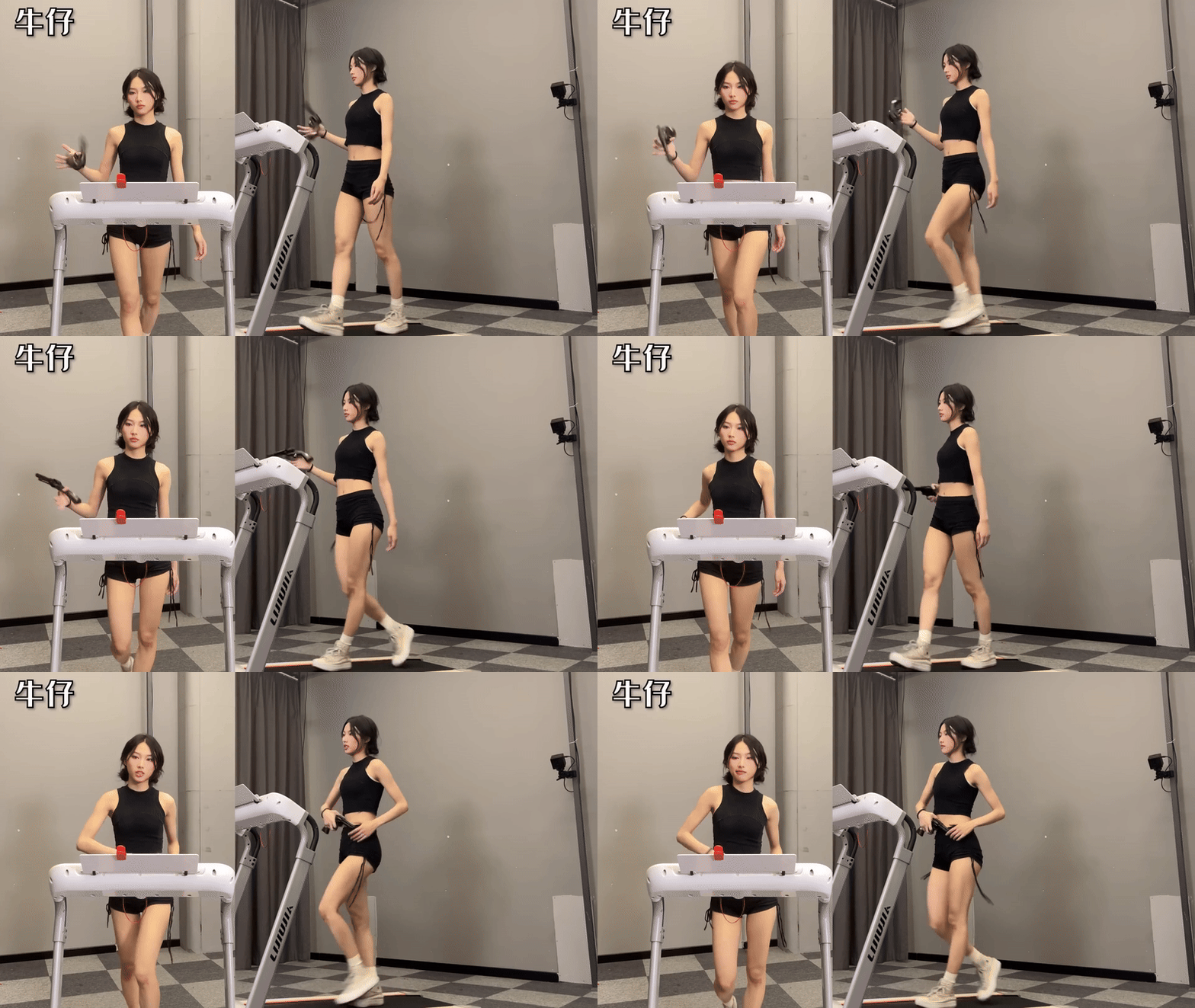
This scene has 2 Camera Angles used, a view from the Front on the left, and a Three-Quarter view on the right.
The Front angle shows us Two axis’ of information, Horizontal movements Side to Side (such as the hips swinging left and right) and Vertical Movements (look at her head as it bobs with each step).
We can easily see how far SAKANA is holding the prop gun from her body, while also having a clear view of her face. Viewing these areas that can be animated in addition to seeing if the walk’s gait looks natural, makes the Front angle worth having.
But the best reference angle you can have for a walk is the Three Quarter angle, letting you see all Three Axis of Side to Side, Up and Down, then also having Forward and Back. (Which is normally called the X Axis, Y Axis and Z Axis)
This lets us see how the Shoulders are not just bobbing up and down, but also rotating which each step and for holstering the prop. (At least more easily than the Front view)
We also see a better view of her strides, how far her feet go behind her torso and how far she steps in front. If you only had a single view for reference, this would be the most valuable.
(Sometimes you’d also have a Side view to work with, which if you combine with the Front view can also work for making a walk.)
So, what about the treadmill?
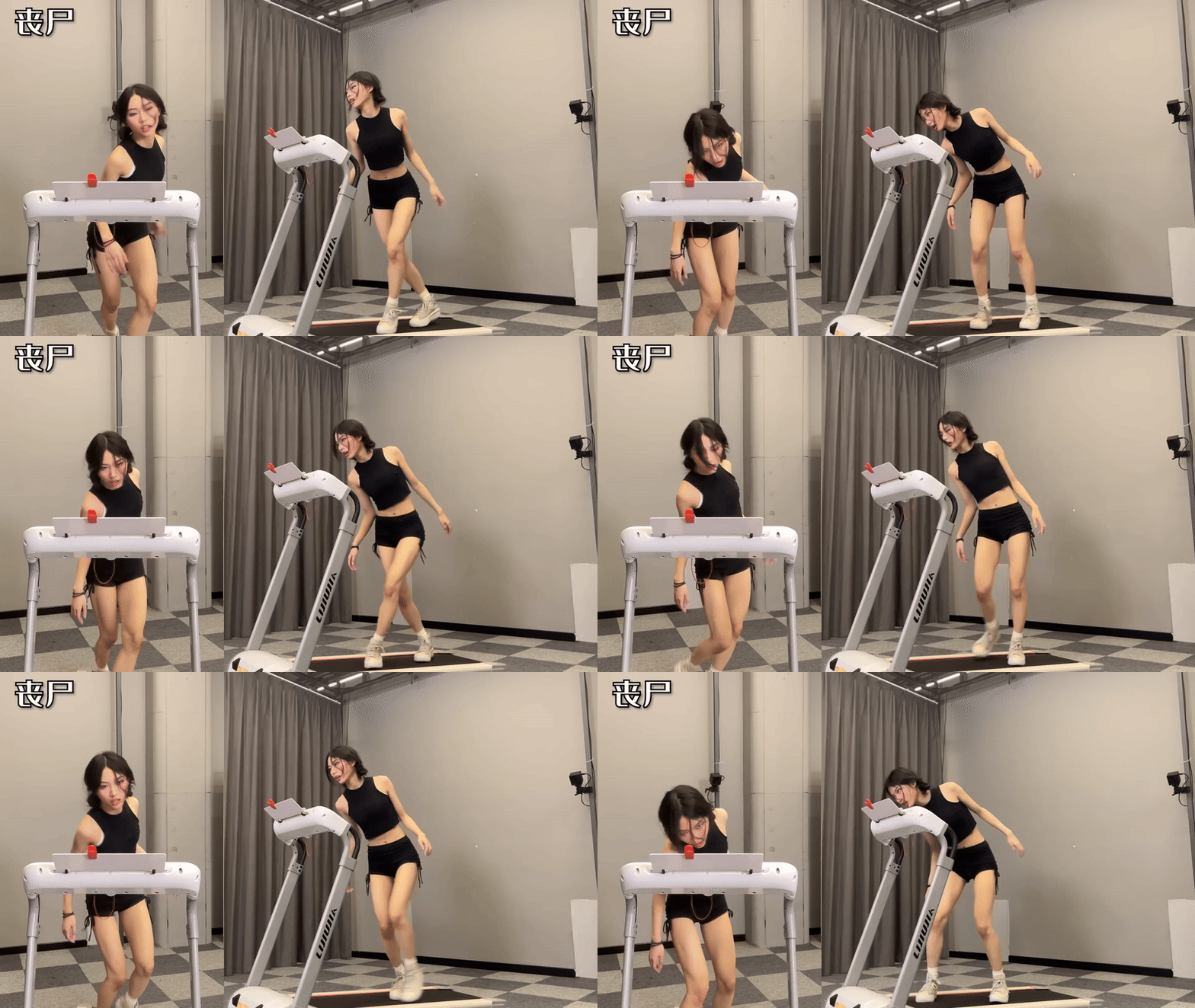
The Treadmill (as you may have assumed) is for keeping pace. Look at this Zombie walk above. It’s a Non-standard walk with weird step timing and unnatural looking movement that suddenly juts forward.
Sadly the video cuts this clip a little short, but after that jut forward she would then pause (to move down the treadmill), then start regular steps again. This creates a Loop.
If you have a Loop of animation that can be copy and pasted whose beginning and end connects with itself, you then have a Walk Cycle that we Animators can create.
But to find that Loop, you need the actor to follow pace, which is what SAKANA has done for all the scenes we’ll cover today.
Speaking of which, lets take a look at Why these references are so useful.
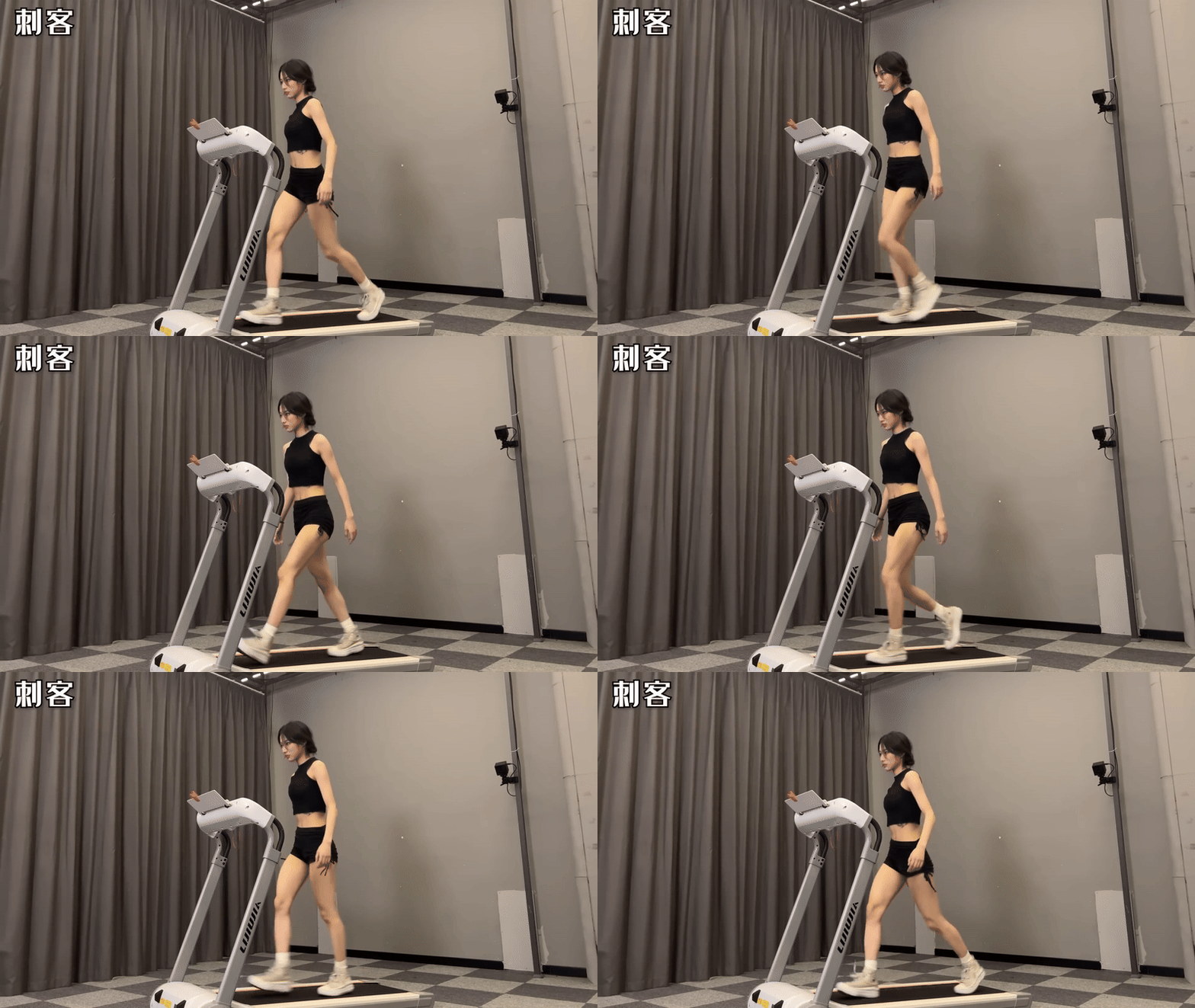
Here we have an example of a Masculine walk. Head held forward, torso leaning forward, wide and stiff shoulders, very little hip sway and long strides.
This is a walk that is focused on a single target and determined to get there, it’s very utilitarian and tries to minimize torso and head movement.
Yet minimal movement does not mean ZERO movement, take a look again at the walk.
Head held forward, but bobbing up and down with each step. Her shoulders aren’t moving on their own, but are rotating with her upper torso making the arms swing in a longer arc (even though they only move at the elbow). Her stomach is counter-rotating with the hips, keeping her upper torso level.
And of course, the arms and legs move in tandem with one another.
The general motion is plain to see, but it’s the subtler motions stacked on top that makes this walk show so much character.
Lets see another example.
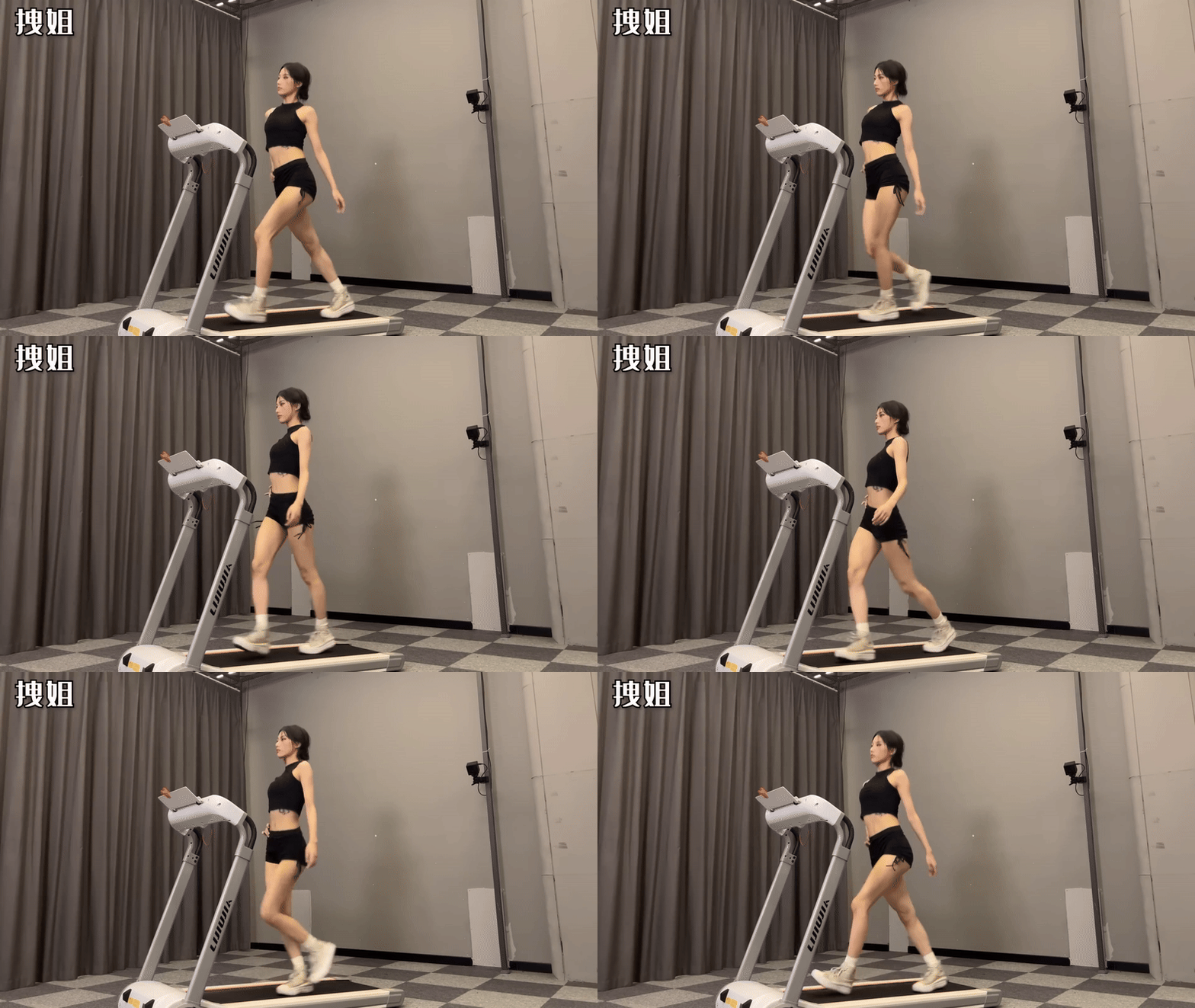
Here we have a Feminine walk, the same action give a completely different motion.
Held held up, large shoulder rotations, chest puffed out, wide hip swings, and shorter but faster strides.
This is less about being focused and more about being the Center of Focus, drawing attention to herself. In fact, while we can’t see the right arm on her hip, the lack of movement from that arm contrasts the amount of motion from the main body, which further emphasizes the shoulder and hip movements.
The head bobs in a different fashion, while the Masculine walk tried to keep the head steady to see the path forward, here the Feminine walk is tilting the head side to side, if not almost making a circular motion with her face. Almost as if she’s unconcerned with what’s in front of her, and knows that the path will be clear.
Another big change is the torso’s counter rotation point. For the Masculine walk, SAKANA’s stomach nullifies the rotation from her hips to her torso to reduce movement. Here we actually see her stomach rotating with her hips to emphasize movement, and the actual point of counter rotation is closer to the base of her ribcage.
To get these two walks with 3D Animation, we’d have to use completely different joints in the torso to replicate those movements. If we tried to mimic the Feminine walk with the Masculine’s center of rotation, we’d have to rotate the stomach to such a degree of emphasis that the bend would no longer look natural.
Hence why studying the action before we begin is imperative, to save time from having to reanimate down the line.
But how do we ‘Start’ a project from a reference video like this? Lets look at the Masculine walk again for this example.
For every (standard) walk, we look at Four Key Frames of the walk. Watching her feet, we need to see when one leg Touches down on the ground, gets Passed by the other leg, Lifts up from the ground, and Passes the other leg, which becomes a loop.
While there are several names for these frames (Another version is Contact, Down, Pass, Up.), what’s important is that this is the basis for animating our own cycle.
Below is the same gif as above, but I isolated the 4 frames that we need.
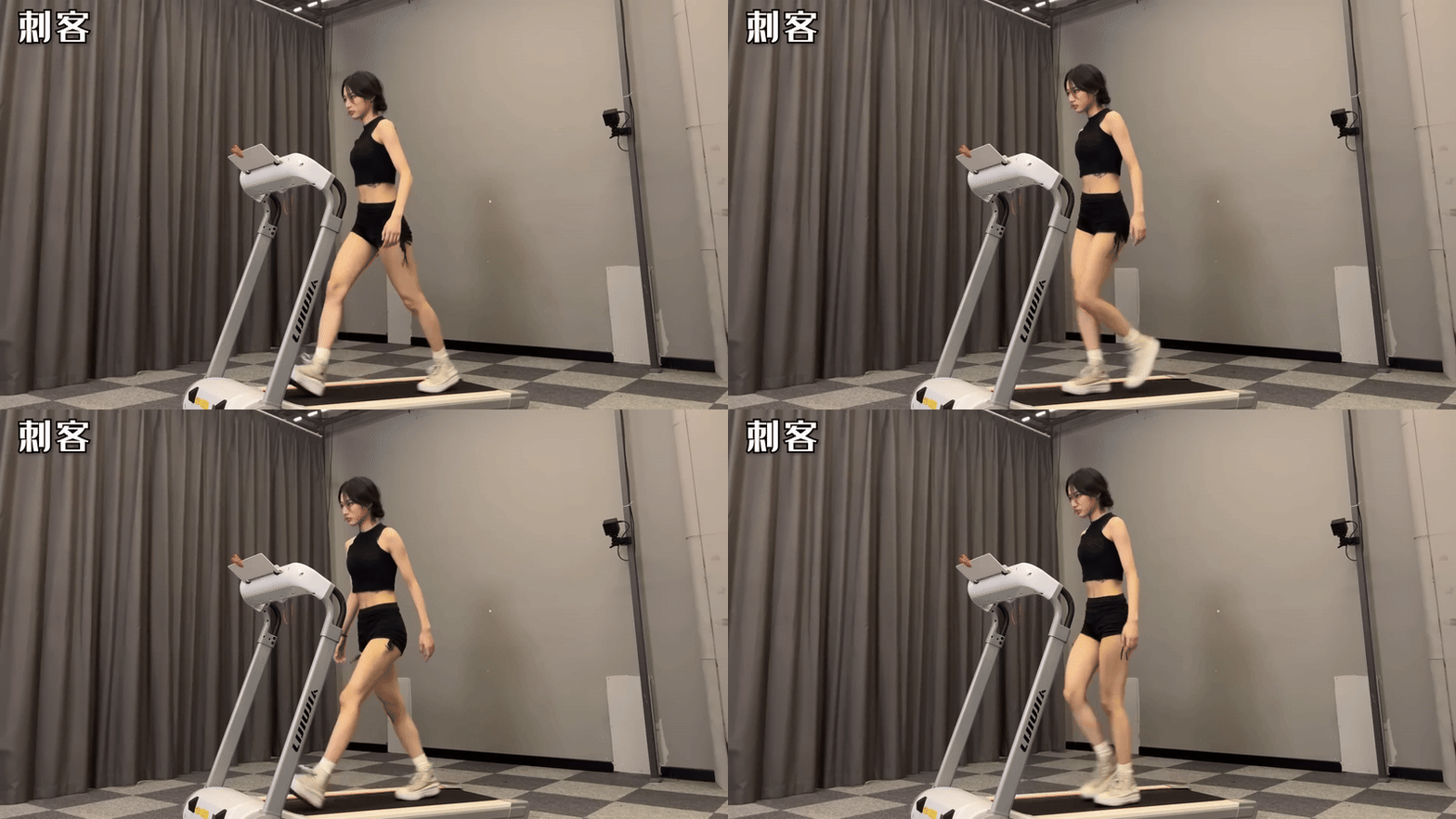
While greatly reduced in total frames, these Key Frames makes the walk readable. Without these poses, it becomes hard to track where things should go and what movements should be pushed forward or pulled back.
At this point, rough these key frames as best you can. The don’t need to be perfect, we can still tweak things as the process goes on.
But once you have these four frames, then you add ‘In-Betweens’.
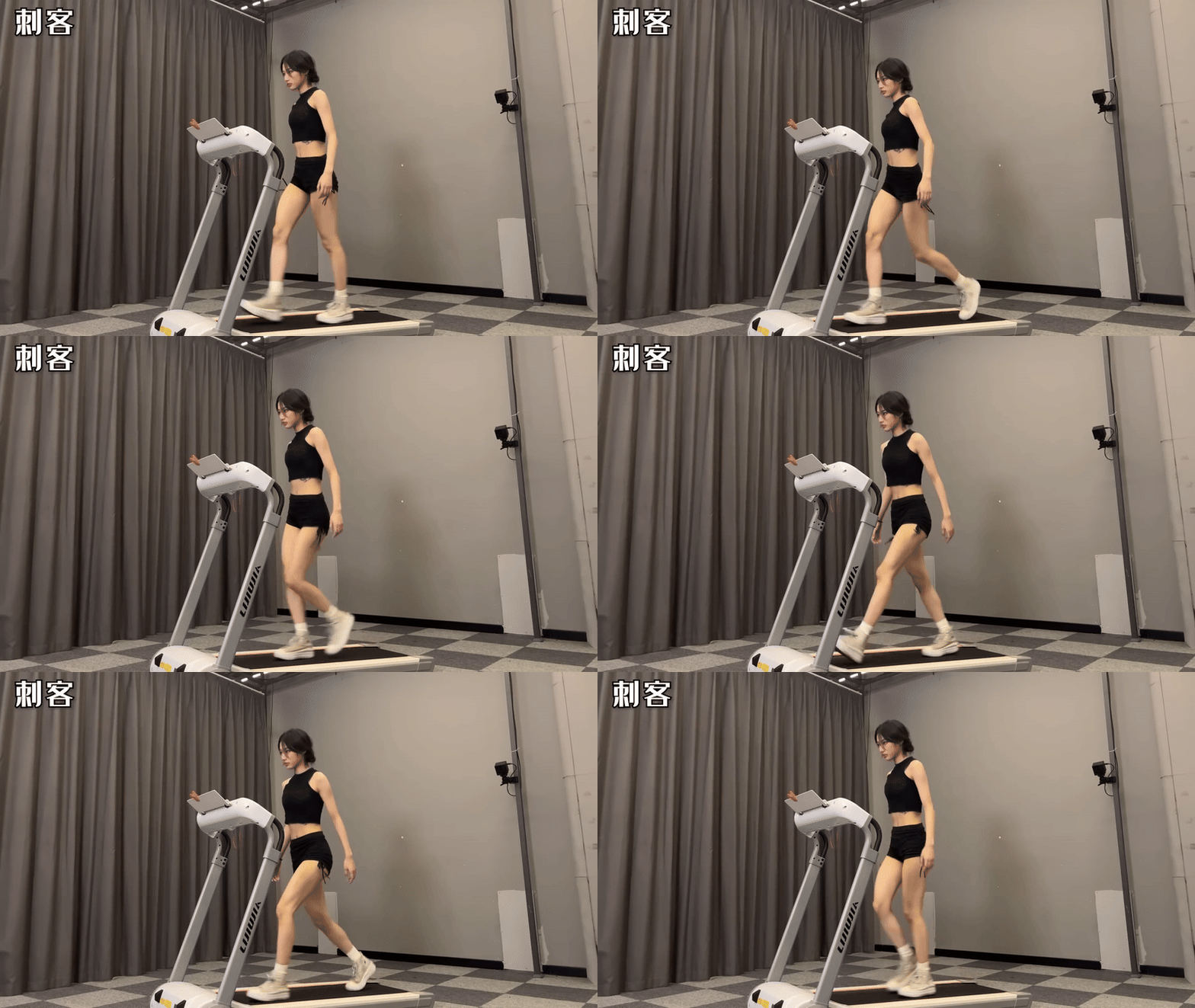
More frames, smoother motion. Most of the time these frames in between the Key frames just split the difference, yet with these extra frames we can now start seeing the smaller movements (like the neck moving for the head bob).
While adding these frames, we’ll likely tweak the Key Frames as needed.
Normally we’d do this process 1 more time, now adding frames between the Key Frames and In Betweens to get us closer to our final product. (This process may change depending on your program/medium, but that’s a topic for another time)
With this final set of frames, once again you tweak the old frames as the new ones are added. But if the frames from the last batch match up quite well, then these shouldn’t have much to edit.
And while we started with 4 Keyframes, we doubled that total to 8 with In Betweens, and ended this sequence with 16 Frames total we had to create.
Doesn’t sound like a whole lot of work, but by working with a reference, we can turn a week long project working from scratch, into a single day’s work by having an answer sheet right before us!