

Referencing Animation Itself, Wit Studio
Instead of the Beginning, Why not view the End Result?

We’ve spent a couple weeks on getting Animation Reference from ‘real life’.
Recording someone’s physical actions is one of the best ways to see how the human body can move, and the realistic timing needed to perform each action.
…But what are the odds you found interest in Animation to just “Replicate Real Life”?
One of the main draws of Animation is that you can see something that does NOT occur in nature, something Fantastical and Beyond the world we see day to day.
So why not use Animation itself as a reference? Let’s take a look ourselves!
For today, I will show you a video directly from Wit Studio’s Youtube Channel, the studio who made the Anime Vivy: Fluorite Eye’s Song. Take a look below!
(Fun Fact! “Anime” is originally Japanese slang for ‘Animation’. But during the 80’s and 90’s when Japanese animations started being brought over to the ‘West’ (U.S. and Europe), the term Anime became used by the West to refer to Japanese Animation as “Anime”. And since Japan’s Animation was primarily 2D and the West began focusing on 3D Animation in the late 90’s, it became standard to call 2D Animations “Anime” and 3D Animations as just ‘Animations’.)
(A 2D movie would be an “Anime Movie”, while a 3D movie would be an “Animated Movie”. Seems dumb after writing it out, but among many things it’s our weird modern standard.)
The video above you just saw was Wit Studio’s “Pilot Movie” for their Anime series “Vivy: Fluorite Eye’s Song”.
In TV a ‘Pilot’ episode can refer to the First Episode of a series, but it’s actually a way to test an audience’s reception to their show before fully committing to production.
Originally this video was made and shared in-house (or in Wit’s studio), showing a variety of different scenes to provide a ‘slice’ of what the show could offer. Since the project is complete, they released it to the Public.
The reason why I wanted to share this show, is because Many of the main characters aren’t humans, but Robots.
This means that we can view characters that move like humans (in that their joints bend the same way), while having Super Human strength and speed.
And if you want your animations to be on more of the Fantastical side of things, the best place to reference is not fact, but Fiction! (As in, check out other Animations!)
Lets check out the Flashiest scene from the Pilot video:
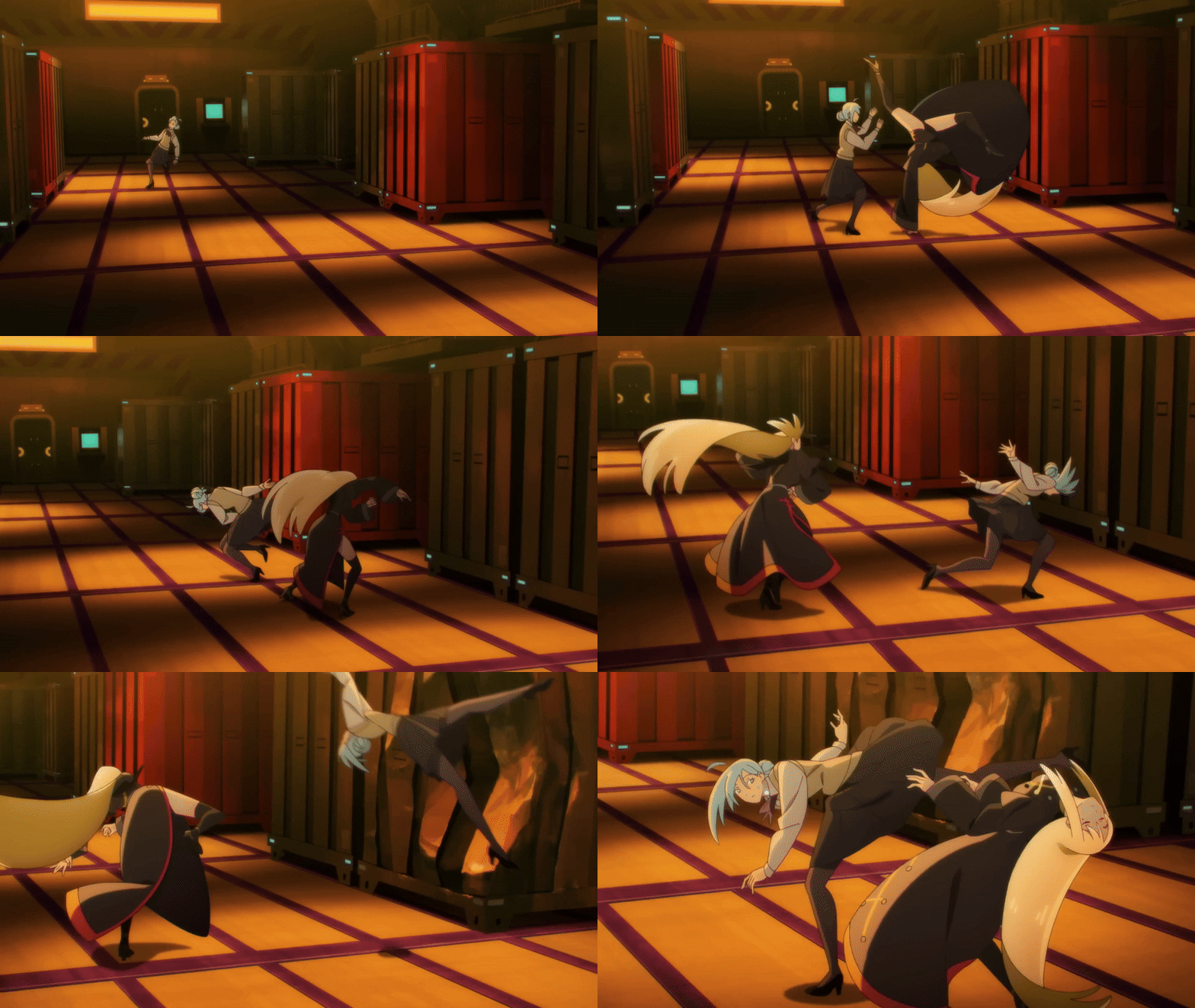
High jumps, heavy stomps, flying sparks and plenty of roundhouse kicks to go around!
But to use this as reference, we need to break down this sequence into actions and purposes, such as:
Why are there sparks flying with each major impact? They show not only the weight of each impact, but also that the impact is metal on metal. (This may be happening because they are Robots, or their shoes are metal, etc.)
Why is the screen/camera shaking so much? It makes the scene feel more lively, and it blends the characters in the foreground with the background (more on this later).
Why are there so many kicks in this fight/sequence? Since the characters are Robots, we assume their logic is to use the most powerful attack they can use (in this case, a kick). And since their sense of balance far surpasses that of a human, they can each crank out kicks (and flips) on a dime and as needed.
When asking these questions, you need to decide how much of this information you want to use. If all you want are the actions themselves (maybe you wanted to see a few different ways to do a kick), then take only that and forget the rest.
It’s your animation, so only put in what you think you’ll need!
Fight scenes are the most memorable, but there can be other scenes worth referencing:
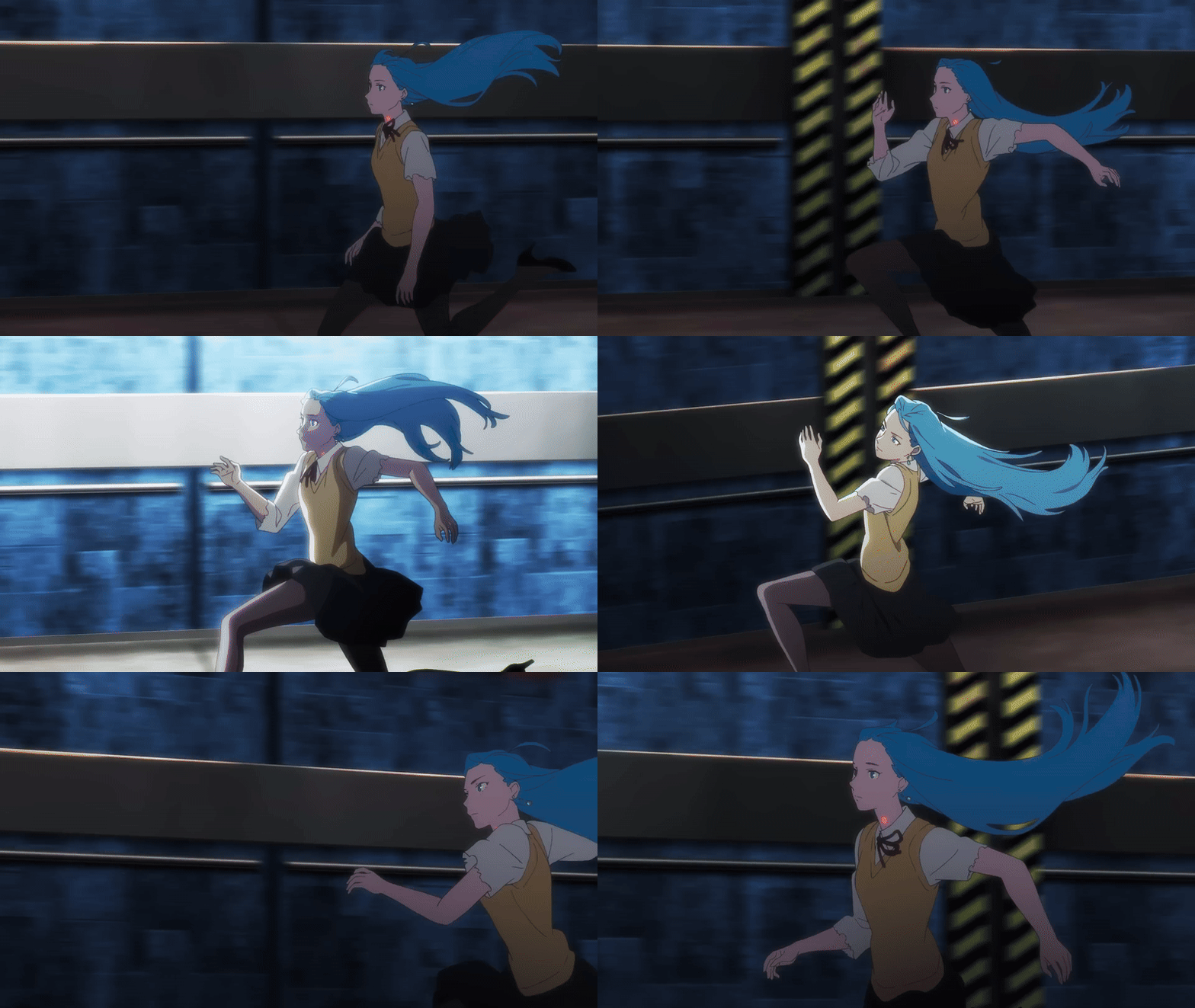
The pace of the run, the hair flapping in the wind, how fast the background is moving.
If you’re lucky enough to spot them, scenes like this one above that closely track a character are also worth looking over.
While the running animation is nice, take a look at how she moves across the screen.
Vivy starts at the far right, and slowly moves to the center. Her fast pace is obviously meant to show how fast she’s running, but this movement shows to the audience that Vivy is speeding up.
By Zagging to her left, we can see she is either dodging something or making a turn. Having her move around the screen is the reverse technique of the camera shaking from the last scene, making her run appear more lively that it normally would be.
Combine this with the Light that she passes in this assumed tunnel, it makes the background feel like a proper Environment to be interacted with, instead of just set dressing for the scene. (Also by ‘passing’ the light, it shows distance being traveled.)
If you’re willing to get a bit technical, we can dig for more information.
This time, let’s look at a sequence from the Most Famous fight scene from the show (not in the Pilot Episode): Vivy vs. Elizabeth.
This fight differs from the one above, in that the characters are far closer to the camera, causing wide sweeping shots to keep the characters on screen.
We also have a closer view of the action, meaning we see more frames of the characters coming into contact with each other.
Seeing how the camera plays with distance, zooming in and out as the characters move in and out of range of each other is also nice to see.
But we’re here to use a special tool, Speed.
If I take the Gif above at slow it down to 25% of it’s original speed, what do you think will happen? Lets take a look:

Something you likely noticed right away, ‘The characters have less frames than the background does!’ and that’s true!
What’s happening here, is that the character’s animations are actually ‘attached’ to the camera, and as the camera moves around the room (which is a Static Image), so too then the characters move about the room.
Yet what’s more interesting to note, is how long these animation frames “hold” on screen. If the animation’s normal speed was 24 Frames Per Second, then these frames would likely beholding for ‘2 frames’, meaning that there’s only 12 Actual Frames in that second of animation. (This is called Animating on 2’s)
While this feels clearly slow and chunky at this speed, you can’t lie about the results of the full speed version looking good.
For 2D Animators, this helps give you an idea of which frames will help make an action readable. 3D Animators will likely have their program fill movement between key frames, but seeing how these 2D frames can be adapted into 3D Poses will make your animations much stronger.
Now if you Really want to get a close look at an animation, there is one piece of information you should Always check to see if it exists, Behind the Scenes Footage!

It could be storyboards, or in the case above the Key Animation without the colors yet applied and only the shapes blocked out. (This was shared on Wit Studio’s Twitter)
There is some slight shading to tell which objects are one unit or to show depth, but nowhere near the extent of the finished scene.
Something particular to BTS (behind the scenes) footage of 2D Animations, is that written Frame Count on the bottom left side of the screen. Take a look at this slowed down Gif below for a better look.

We can see the letter A followed by a circled number (in this case, numbers from 1 to 80). This marks each exact frame with a number for the main action.
You can also see a B with a number written in Purple. Those link up with the Purple sparking/lightning, signifying that these are Secondary frames (aka special effect frames that will be placed on top of the Primary (A) Frames).
While this won’t tell you exactly Why these steps are taken or how they got here, but seeing this work-in-progress combined with the end result can give you a few ideas of where to look/research next for your own animations.
Better yet, if you dig deep enough you may find the inspirations that these animators used for their scenes, giving you more references to absorb and enjoy!